Last time, we talked about OpenMP syntax and some directives. Next we'll talk about a few more.
The sections directive is useful if you have a few separate parallelizeable tasks that you want different threads to run. For maximum portability and efficiency, I don't recommend this directive, for reasons that you will see. But if you have a couple of different tasks to parallelize, here's the syntax you would use:
#pragma omp sections
{
#pragma omp section
/* first section */
#pragma omp section
/* second section */
}
As you can see, in the example above, if you had more than two threads, only two of them would be used, and the rest would be idle. If this is the only way you can parallelize the work, then it's better than nothing, but if there's another angle to attack the problem, then I'd try that.
In certain algorithms, you may need thread synchronization. It could be that you have a task that depends on a previous task being completed, so you need to make all the threads wait until the first task completes before going on to the second. Or, you may have a task that's not thread safe, so you need to have only one thread at a time perform that task. Or you may have a task that only one thread can perform. If so, you are in luck, because there are synchronization directives just for these purposes!
The barrier directive creates a stopping point which a thread reaches and cannot proceed past until all the threads have reached the barrier. The threads don't all have to reach the exact same barrier call in order for them to stop there, but they do have to encounter the same sequence of work-sharing and barrier regions. The syntax is wonderfully simple:
#pragma omp barrier
The critical directive specifies a section of code which must be executed by only one thread at a time. Give each critical section its own unique name; otherwise all identically named critical sections considered the same critical section.
#pragma omp critical [name]
{
// code
}
A single section is useful for parts of the code that must be executed by only one thread, e.g., writing out to a file.
#pragma omp single
{
// code
}
There are many other directives, but I'll just cover one last one: reduce. The reduce directive is used to reduce a list of variables into one, using an operator such as sum, product, etc. In C, valid operators are +, -, *, &, ^, |, &&, or || . Here is an example:
#pragma parallel for reduction(+:n_eq)
for (i = 0; i < N; i++) {
if (a[i] == b[i]) {
n_eq = n_eq+1;
}
}
Next installment: Variable scope
Showing posts with label supercomputing course. Show all posts
Showing posts with label supercomputing course. Show all posts
Friday, February 20, 2009

Monday, December 15, 2008
Supercomputing Course: OpenMP Syntax and Directives, Part II
In order to be parallelizable by a parallel for construct, a loop must satisfy certain conditions. First, the number of iterations of the loop must be fixed, and knowable upon entry into the loop. Second, each iteration must be independent of the others. And finally, there must be no data dependence between iterations.
So, here are some things we can't parallelize with a parallel for construct:
In many scientific problems, we want to solve a system of linear equations. One of the ways to do this is known as Gaussian elimination. Suppose we want to parallelize the following Gaussian elimination code:
/* Gaussian Elimination (no pivoting): x = A\b */
for (int i = 0; i < N-1; i++) {
for (int j = i; j < N; j++) {
double ratio = A[j][i]/A[i][i];
for (int k = i; k < N; k++) {
A[j][k] -= (ratio*A[i][k]);
b[j] -= (ratio*b[i]);
}
}
}
We have three possible candidate loops to parallelize. Which one should we select?
First, we need to really understand how Gaussian Elimination works. For this, I refer to the below picture. (Click to embiggen.)
 You can see the progression of Gaussian elimination in the four frames of this picture. The i loop is represented by the yellow row and column. Basically, we take the entries in the yellow row and column and use them to update the green submatrix before going on to row/column i+1. This tells us all we need to know about the parallelizeability of the i loop. The values of the entries in the (i+1)st yellow area depend on what operations were performed on them at previous values of i. Therefore we can't use OpenMP to parallelize this loop because of data dependence.
What about the j loop? The number of iterations in that loop varies with i, but we do know the number of iterations every time we are about to enter the loop. Do any of the later iterations depend on earlier ones? No, they do not. Can the j iterations be computed in any order? Yes, they can. So it looks like the j loop is parallelizable.
What about the k loop? Like the j loop, its number of iterations varies but is calculable for every i. None of the later iterations depend on earlier ones, and they can all be computed in any order. Therefore the k loop is also parallelizable.
So, we can't parallelize the outermost loop, but we can parallelize the inner two. Which one should we select? It's best to select the outer loop, because then we'll have more uninterrupted parallelism.
So, our Gaussian elimination code now looks like this (changes in red):
/* Gaussian Elimination (no pivoting): x = A\b */
for (int i = 0; i < N-1; i++) {
#pragma omp parallel for
for (int j = i; j < N; j++) {
double ratio = A[j][i]/A[i][i];
for (int k = i; k < N; k++) {
A[j][k] -= (ratio*A[i][k]);
b[j] -= (ratio*b[i]);
}
}
}
(Observe that we can combine the parallel and for constructs.)
Isn't that just amazing? We can parallelize this piece of code for the modest cost of one additional line! And our algorithm is still easy to read: It's not obscured by calls to OpenMP functions. Compare this to our old friend MPI. I never cease to be amazed by the compactness of OpenMP.
Next time, we'll talk about some other OpenMP directives, including sections, reduction, and some synchronization directives.
So, here are some things we can't parallelize with a parallel for construct:
- Conditional loops (e.g., many while loops; it's best to recast your parallelizable while loop as a for loop if you want to use the parallel for construct)
- Iterators over a loop (e.g., C++ STL iterators over a std::list)
- Loops in which any of the iterations are dependent upon any of the previous iterations
- Loops in which there is data dependence between iterations.
In many scientific problems, we want to solve a system of linear equations. One of the ways to do this is known as Gaussian elimination. Suppose we want to parallelize the following Gaussian elimination code:
/* Gaussian Elimination (no pivoting): x = A\b */
for (int i = 0; i < N-1; i++) {
for (int j = i; j < N; j++) {
double ratio = A[j][i]/A[i][i];
for (int k = i; k < N; k++) {
A[j][k] -= (ratio*A[i][k]);
b[j] -= (ratio*b[i]);
}
}
}
We have three possible candidate loops to parallelize. Which one should we select?
First, we need to really understand how Gaussian Elimination works. For this, I refer to the below picture. (Click to embiggen.)
 You can see the progression of Gaussian elimination in the four frames of this picture. The i loop is represented by the yellow row and column. Basically, we take the entries in the yellow row and column and use them to update the green submatrix before going on to row/column i+1. This tells us all we need to know about the parallelizeability of the i loop. The values of the entries in the (i+1)st yellow area depend on what operations were performed on them at previous values of i. Therefore we can't use OpenMP to parallelize this loop because of data dependence.
What about the j loop? The number of iterations in that loop varies with i, but we do know the number of iterations every time we are about to enter the loop. Do any of the later iterations depend on earlier ones? No, they do not. Can the j iterations be computed in any order? Yes, they can. So it looks like the j loop is parallelizable.
What about the k loop? Like the j loop, its number of iterations varies but is calculable for every i. None of the later iterations depend on earlier ones, and they can all be computed in any order. Therefore the k loop is also parallelizable.
So, we can't parallelize the outermost loop, but we can parallelize the inner two. Which one should we select? It's best to select the outer loop, because then we'll have more uninterrupted parallelism.
So, our Gaussian elimination code now looks like this (changes in red):
/* Gaussian Elimination (no pivoting): x = A\b */
for (int i = 0; i < N-1; i++) {
#pragma omp parallel for
for (int j = i; j < N; j++) {
double ratio = A[j][i]/A[i][i];
for (int k = i; k < N; k++) {
A[j][k] -= (ratio*A[i][k]);
b[j] -= (ratio*b[i]);
}
}
}
(Observe that we can combine the parallel and for constructs.)
Isn't that just amazing? We can parallelize this piece of code for the modest cost of one additional line! And our algorithm is still easy to read: It's not obscured by calls to OpenMP functions. Compare this to our old friend MPI. I never cease to be amazed by the compactness of OpenMP.
Next time, we'll talk about some other OpenMP directives, including sections, reduction, and some synchronization directives.
Sunday, December 14, 2008
Supercomputing Course: OpenMP Syntax and Directives, Part I
The OpenMP standard covers the C, C++, and Fortran programming languages. There is one syntax for C and C++, and another for Fortran. In this tutorial, I will focus on the C/C++ syntax.*
The basic format of an OpenMP directive is as follows:
#pragma omp directive-name [clause] newline
(Incidentally, the word pragma is Greek for "thing.") If you have a compiler that doesn't understand OpenMP, it will simply ignore the pragma lines, making it possible to use the same code file for both OpenMP-parallelized and serial code.**
A few more points about the syntax:
#pragma omp parallel private(list) shared(list)
{
/* put parallel code here */
}
The parallel directive is used to create a block of code that is executed by multiple threads. The code in brown are optional arguments to the directive -- private and shared variables, which we'll talk about later.
Here is a sample code -- the OpenMP equivalent of "Hello World":
#include <stdio.h>
#include <omp.h>
int main (int argc, char *argv[]) {
int tid;
printf("Hello world from threads:\n");
#pragma omp parallel private(tid)
{
tid = omp_get_thread_num();
printf("(%d)\n", tid);
}
printf("I am sequential now\n");
return 0;
}
Suppose we run this program using four threads. What will be the output of this example?
may be the answer you're counting on, but it may not be what you receive. The output
is just as valid and just as likely. The point being, the operating system schedules the threads, and you should not count on them executing in any particular order.
The most common directive other than the parallel section directive (which you must use in every program to contain the parallel section of code) is the parallel for directive. The syntax is as follows:
#pragma omp for schedule(type [,chunk]) \
private(list) shared(list) nowait
{
/* for loop */
}
where type = {static, dynamic, guided, runtime}. If nowait is specified, then the threads won't wait around for all threads to finish up the for loop before moving on to the next thing.
The default scheduling is implementation dependent. The scheduling choices are somewhat intuitive in meaning. Static scheduling simply means that the ID of the thread that is assigned a given iteration is a function of the iteration number and the number of threads, and is determined at the beginning of the loop. This is a simple way to assign iterations, but it could be a bad idea if different iterations have different amounts of work to them. For example, if every fourth iteration has extra work, and we have four threads, then a certain thread will be assigned that work-laden iteration every time, and we will have a load imbalance.
In that case, the dynamic scheduling algorithm may be a better choice. The threads are assigned iterations of the loop over the course of the execution of the loop, in a round robin fashion. So, a thread that is idle gets the next piece of work to do, meaning that threads are assigned work based on their ability to complete the work. In this way, load balance can occur.
You are probably wondering how to use the parallel for construct, but this entry has gotten very long so I will stop here for now. Next time, we will discuss the parallel for further, and I will provide an example.
* This is because as a computer scientist, I think that C and C++ are pretty nice languages, and Fortran, which in a just world would be nothing more than a fascinating relic of the past, is an undead zombie language that refuses to die.
** This is true for OpenMP directives, but if you use any of the runtime library routines, you will need to do a little more to make things work. We will talk about this when we talk about runtime library routines.
The basic format of an OpenMP directive is as follows:
#pragma omp directive-name [clause] newline
(Incidentally, the word pragma is Greek for "thing.") If you have a compiler that doesn't understand OpenMP, it will simply ignore the pragma lines, making it possible to use the same code file for both OpenMP-parallelized and serial code.**
A few more points about the syntax:
- Note the newline at the end of the directive line. We will see some pragma that require braces around the code to be parallelized. You must put the beginning curly brace on the line after the directive, not on the same line as the directive like many people do in the case of for loops.
- The pragma are case sensitive, and follow all the standard C/C++ pragma rules.
- If your directive is really long, you can continue it on the next line by putting a backslash as the final character in the previous line.
#pragma omp parallel private(list) shared(list)
{
/* put parallel code here */
}
The parallel directive is used to create a block of code that is executed by multiple threads. The code in brown are optional arguments to the directive -- private and shared variables, which we'll talk about later.
Here is a sample code -- the OpenMP equivalent of "Hello World":
#include <stdio.h>
#include <omp.h>
int main (int argc, char *argv[]) {
int tid;
printf("Hello world from threads:\n");
#pragma omp parallel private(tid)
{
tid = omp_get_thread_num();
printf("(%d)\n", tid);
}
printf("I am sequential now\n");
return 0;
}
Suppose we run this program using four threads. What will be the output of this example?
Hello world from threads:
(0)
(1)
(2)
(3)
I am sequential now
may be the answer you're counting on, but it may not be what you receive. The output
Hello world from threads:
(3)
(1)
(0)
(2)
I am sequential now
is just as valid and just as likely. The point being, the operating system schedules the threads, and you should not count on them executing in any particular order.
The most common directive other than the parallel section directive (which you must use in every program to contain the parallel section of code) is the parallel for directive. The syntax is as follows:
#pragma omp for schedule(type [,chunk]) \
private(list) shared(list) nowait
{
/* for loop */
}
where type = {static, dynamic, guided, runtime}. If nowait is specified, then the threads won't wait around for all threads to finish up the for loop before moving on to the next thing.
The default scheduling is implementation dependent. The scheduling choices are somewhat intuitive in meaning. Static scheduling simply means that the ID of the thread that is assigned a given iteration is a function of the iteration number and the number of threads, and is determined at the beginning of the loop. This is a simple way to assign iterations, but it could be a bad idea if different iterations have different amounts of work to them. For example, if every fourth iteration has extra work, and we have four threads, then a certain thread will be assigned that work-laden iteration every time, and we will have a load imbalance.
In that case, the dynamic scheduling algorithm may be a better choice. The threads are assigned iterations of the loop over the course of the execution of the loop, in a round robin fashion. So, a thread that is idle gets the next piece of work to do, meaning that threads are assigned work based on their ability to complete the work. In this way, load balance can occur.
You are probably wondering how to use the parallel for construct, but this entry has gotten very long so I will stop here for now. Next time, we will discuss the parallel for further, and I will provide an example.
* This is because as a computer scientist, I think that C and C++ are pretty nice languages, and Fortran, which in a just world would be nothing more than a fascinating relic of the past, is an undead zombie language that refuses to die.
** This is true for OpenMP directives, but if you use any of the runtime library routines, you will need to do a little more to make things work. We will talk about this when we talk about runtime library routines.
Tuesday, December 09, 2008
Supercomputing Course: OpenMP
OpenMP is the industry standard shared memory programming model. First developed in 1997, the OpenMP standard is updated by an architecture review board (ARB).
There are several really great advantages to OpenMP. First, it allows you to take an incremental approach to parallelization. You can parallelize the the parts that will have the most impact before parallelizing the rest, optimizing your effort-to-improvement ratio. Second, the constructs you use to parallelize the code are simple to read, and most are one-liners, so your code doesn't grow that much. And finally, you can use the same code as parallel or serial code -- just compile it with or without OpenMP enabled, depending on what you want.
The OpenMP API is a combination of directives, runtime library routines, and environment variables. These components of the API fall into three categories: expression of parallelism, data sharing among threads, and synchronization.
The OpenMP parallelism model is a fork-and-join model. That is, when your program starts running, there is a single thread of control. When it reaches a parallel section, it forks into multiple threads, which rejoin into the single thread upon reaching the end of the parallel section.
The nuclear physicist in our previous installment could write a hybrid MPI/OpenMP program to solve a bigger problem. She would reproduce the basis functions once on each node, and then use OpenMP to parallelize the computations across the node. As we will see in the next installment of this course, there are many OpenMP directives that can be used to parallelize many common features of algorithms.
There are several really great advantages to OpenMP. First, it allows you to take an incremental approach to parallelization. You can parallelize the the parts that will have the most impact before parallelizing the rest, optimizing your effort-to-improvement ratio. Second, the constructs you use to parallelize the code are simple to read, and most are one-liners, so your code doesn't grow that much. And finally, you can use the same code as parallel or serial code -- just compile it with or without OpenMP enabled, depending on what you want.
The OpenMP API is a combination of directives, runtime library routines, and environment variables. These components of the API fall into three categories: expression of parallelism, data sharing among threads, and synchronization.
The OpenMP parallelism model is a fork-and-join model. That is, when your program starts running, there is a single thread of control. When it reaches a parallel section, it forks into multiple threads, which rejoin into the single thread upon reaching the end of the parallel section.
The nuclear physicist in our previous installment could write a hybrid MPI/OpenMP program to solve a bigger problem. She would reproduce the basis functions once on each node, and then use OpenMP to parallelize the computations across the node. As we will see in the next installment of this course, there are many OpenMP directives that can be used to parallelize many common features of algorithms.
Monday, December 08, 2008
Supercomputing Course: Scalability, Memory, and Multicore Architecture
Remember my supercomputing course? Good! Here's another installment.
We discussed scalability before. To review, there are two primary measures of scalability of your program: strong scaling, in which we throw different numbers of processors at a constant-sized problem, and hope that the wall time to completion is inversely proportional to the number of processors; and weak scaling, in which we throw a constant amount of work per process at varying numbers of processors, and hope that the wall time to completion remains constant.
Scalability is a very handy concept, because it alerts us to bottlenecks in our algorithms. We may not know exactly what's wrong, but if we see that the numbers are not what we would like them to be, we can go in and check it out.
Sometimes, however, we get some false readings from our scaling studies. For example, I once had superlinear speedup, meaning that in my strong scaling study, I found that it took less than half the wall time on 2N processors that it did on N processors. This was because of caching effects -- a (2N)th of the problem fit fully into cache memory, while an Nth did not. Since the machine never had to access the slower memory, the computation went even faster than it would have otherwise.
Speaking of memory, to solve some problems we have to duplicate a data set across every process. For example, a nuclear physicist might need to store her basis functions on every process, because the basis functions are used in the computation of potentials for every particle in the nucleus. This can be very redundant, and especially in the case of today's mixed distributed and multicore supercomputer architecture, it is also a waste of memory space.
On a multicore supercomputer, instead of each processor consisting of a single CPU plus memory, we have multiple CPUs that physically share one large chunk of memory. If we use MPI, then we treat each CPU as if it is a single CPU with memory that is inaccessible to all the other processes, even the ones that are on the same board sharing the same memory pool with it. So in this scenario, the nuclear physicist would have to reproduce the same data twice for a dual-core node, four times for a quad-core node, or eight times for an eight-core node. For example, on a quad-core machine with 2 GB memory per core, if our basis functions take up 1 GB, then the redundant basis function storage occupies 4 out of the 8 GB available. Wouldn't it be cool if we could just reproduce it once? We could use that extra 3 GB to solve a bigger problem.
We could use only one of the cores on the node, letting the rest remain unused, and use all the memory on the node for that one processor. Unfortunately, any computations that we perform will be done on only one of the cores, thereby slowing them by a factor of n for an n-core node.
What we need instead is a way to take advantage of all the memory while simultaneously using all the processors when we do computations. In other words, we want to use a distributed memory programming model between multicore nodes, and a shared memory programming model within the nodes. Is there a shared memory programming model that we could use for this purpose?
Of course there is; it's called OpenMP, and it's the topic of the next installment of this course!
We discussed scalability before. To review, there are two primary measures of scalability of your program: strong scaling, in which we throw different numbers of processors at a constant-sized problem, and hope that the wall time to completion is inversely proportional to the number of processors; and weak scaling, in which we throw a constant amount of work per process at varying numbers of processors, and hope that the wall time to completion remains constant.
Scalability is a very handy concept, because it alerts us to bottlenecks in our algorithms. We may not know exactly what's wrong, but if we see that the numbers are not what we would like them to be, we can go in and check it out.
Sometimes, however, we get some false readings from our scaling studies. For example, I once had superlinear speedup, meaning that in my strong scaling study, I found that it took less than half the wall time on 2N processors that it did on N processors. This was because of caching effects -- a (2N)th of the problem fit fully into cache memory, while an Nth did not. Since the machine never had to access the slower memory, the computation went even faster than it would have otherwise.
Speaking of memory, to solve some problems we have to duplicate a data set across every process. For example, a nuclear physicist might need to store her basis functions on every process, because the basis functions are used in the computation of potentials for every particle in the nucleus. This can be very redundant, and especially in the case of today's mixed distributed and multicore supercomputer architecture, it is also a waste of memory space.
On a multicore supercomputer, instead of each processor consisting of a single CPU plus memory, we have multiple CPUs that physically share one large chunk of memory. If we use MPI, then we treat each CPU as if it is a single CPU with memory that is inaccessible to all the other processes, even the ones that are on the same board sharing the same memory pool with it. So in this scenario, the nuclear physicist would have to reproduce the same data twice for a dual-core node, four times for a quad-core node, or eight times for an eight-core node. For example, on a quad-core machine with 2 GB memory per core, if our basis functions take up 1 GB, then the redundant basis function storage occupies 4 out of the 8 GB available. Wouldn't it be cool if we could just reproduce it once? We could use that extra 3 GB to solve a bigger problem.
We could use only one of the cores on the node, letting the rest remain unused, and use all the memory on the node for that one processor. Unfortunately, any computations that we perform will be done on only one of the cores, thereby slowing them by a factor of n for an n-core node.
What we need instead is a way to take advantage of all the memory while simultaneously using all the processors when we do computations. In other words, we want to use a distributed memory programming model between multicore nodes, and a shared memory programming model within the nodes. Is there a shared memory programming model that we could use for this purpose?
Of course there is; it's called OpenMP, and it's the topic of the next installment of this course!
Friday, December 21, 2007
Supercomputing Course: Example Performance Evaluation
I bet you thought I'd never post the final installments of the supercomputing course. It's been how long? Too long! Well, I didn't forget, I just had to wait until I had the right software to make just the right graph. Enjoy!
If you examine the graph you made in the performance evaluation, you may be unpleasantly surprised by your program's performance. Alternatively, you may be quite pleased with your program's performance, but your boss or your dissertation committee want to know how you got such good results. It may be unclear as to what exactly is going on. In order to clarify things, you will want to perform a least-squares fit of your data (performance timings) to an equation that models the performance of your code.
There are three main categories into which everything that your program does will fit: communication, computation, and idle/serial. These categories are mostly self-explanatory. When you are sending and receiving data, that falls into the communication category; when you are crunching numbers, that falls into the computation category; and when one processor is doing an inherently serial operation, or when a processor is waiting for others to finish, then these actions are in the idle/serial category. We can classify each major piece of the algorithm into one of the three categories, and use this information to develop an equation that models the performance of our parallel program.
Suppose we had written a program that finds the numerical integral of a program using Monte Carlo quadrature. The idea of Monte Carlo quadrature is that we can approximate the area under a curve (in 1-D) or the volume under a surface (in 2-D) or the hypervolume under a hypersurface (in n-D) as a function of the average value of the function sampled over the problem domain. In math notation, that's ∫V f(x) dV = V/P ∑i=1P f(xi). The accuracy of the integral is proportional to 1/√P, where P is the number of times we evaluate the function. In order to understand this example, all you really need to know is that we want to compute P different values of the function f(x), and at the end we're going to do something with them.
What follows this paragraph is some C-like pseudocode for this Monte Carlo quadrature program. When I write a program, I generally write out on a piece of paper* a basic algorithm in a code style that is similar to C but that may not be syntactically correct and that may have some commands missing (because I can't remember the exact syntax, or because I don't feel like writing them out). Notes in red are notes to the reader that I would not normally put in my pseudocode. (I also wouldn't put so many comments in my own pseudocode since I mostly know what I'm talking about already.) I recommend writing pseudocode before tackling anything but the simplest of programs.
#include <mpi.h>
#include <stdio.h>
int main(int argc, char **argv) {
// declaration of variables
int me, np;
long P; /* number of function evaluations */
double my_result;
MPI_Status status;
// initialization and environmental inquiry
MPI_Init(&argc, &argv);
MPI_Comm_rank(MPI_COMM_WORLD, &me);
MPI_Comm_size(MPI_COMM_WORLD, &np);
if (me == 0) {
// manager process
// receive input from user as to accuracy we want
double tol;
// tol = input (this is not proper C syntax but I will find the right syntax later)
P = (long) 1./(tol*tol); (the (long) coerces the type, forcing it to go from type double to type long)
long Psend = P/np; // everybody does one npth of the work
for (int i = 1; i < np; i++) {
// send Psend to all worker processors
MPI_Send(&Psend, 1, MPI_LONG, i, me, MPI_COMM_WORLD);
}
// now, do my own Monte Carlo
my_result = monte_carlo(Psend);
double final_result = my_result/np;
for (int i = 1; i < np; i++) {
// receive results from worker processors
double tmp_result;
MPI_Recv(&tmp_result, 1, MPI_DOUBLE, i, i, MPI_COMM_WORLD, &status);
final_result += tmp_result;
}
printf("final result of quadrature, for tol=%g, integral=%g", tol, final_result);
} else {
// worker process
MPI_Recv(&P, 1, MPI_LONG, 0, 0, MPI_COMM_WORLD, &status);
my_result = monte_carlo(P);
my_result /= np;
MPI_Send(&my_result, 1, MPI_DOUBLE, me, me, MPI_COMM_WORLD);
}
return 0;
}
double monte_carlo(long P) {
double answer = 0;
for (long i = 0; i < P; i++) {
// evaluate function at pseudorandom point
// add it divided by P to answer (avoid overflow)
}
return answer;
}
Let's examine this code for the different classes of operations. We could make a table detailing what basic operations occur, which processor performs them, and how many of them take place.
The total walltime is the sum of the time spent computing, communicating, and in serial activities. So we could work out a formula that would approximate the performance of the algorithm. Let's start with the computation.
TNcomputation = TNmonte-carlo + TNsum.
We can break this down further, because the time it takes to do the Monte Carlo part of the computation is proportional to the total number of Monte Carlo points (P = 1/tol2) and inversely proportional to the number of processors (N). The amount of time required to perform the sum is insignificant, so we can treat it as a constant. So we have
TNcomputation = P/N tmonte-carlo + tsum
= 1/(N tol2) tmonte-carlo + tsum,
where tmonte-carlo is the amount of time for a single Monte Carlo point to be computed.
As for the communication, we do N sends and then N receives. They are all done sequentially, and it is reasonable to assume that they each take the same amount of time, so
TNcommunication = 2N tcommunication.
The cost of communication is equal to the startup cost plus the bandwidth cost. But since we are dealing with such small messages (a single long or double) we can neglect the bandwith cost, so tcommunication = tstartup.
Finally, the third category takes all remaining operations into consideration.
TNserial = Tinit/finalize + Tserial.
There's actually no way to distinguish between the tasks in this category in terms of time, since they do not vary with N. So our final equation looks like this:
TN = TNcomputation + TNcommunication + TNnon-parallel
= 1/(N tol2) tmonte-carlo + tsum + 2N tstartup + tserial.
We would want to do a strong scaling study to provide some data to which we can fit this equation. We would run the program on different numbers of processors (most conveniently, powers of two), running it at least three times and taking the average run time for each N. Suppose we got the following timings** from our strong scaling study, for tol = 10-4:
We could make a log-log plot of the results, and see that the algorithm scales pretty well. (You can see this without making a plot by looking at the numbers, and observing that 30.0 is close to one half of 58.6, 15.2 is close to one half of 30.0, etc.) We are not too far off from ideal. The big difference appears to be at the tail end, where the walltime doesn't halve when the processor count is doubled. Let's see how well we can fit these timings to our formula. We have to solve the non-negative least-squares problem
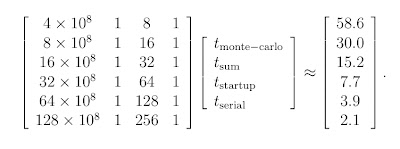
I solved it using Matlab's lsqnonneg function (non-negative least squares), and obtained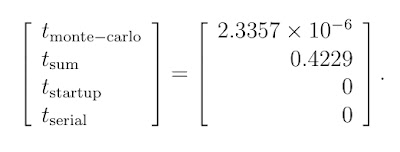
We can graph all these results and see how the algorithm performed and how well our function fits the results. The figure shows a log-log plot of number of processors versus walltime. The solid blue line with the blue dots shows the actual performance data. The dashed red line shows our least-squares fit, and the turquoise dotted line shows ideal scaling.
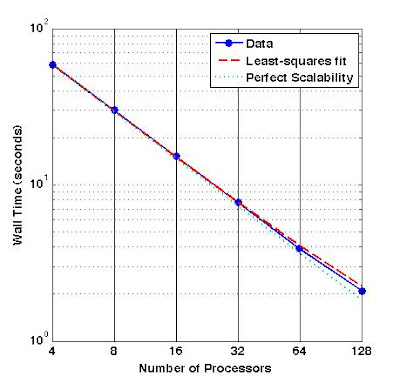
As the number of processors grows, the computation time is not quite halved. We would expect this because the amount of communication is proportional to the number of processors, so doubling the number of processors doubles the amount of communication required. So as the number of processors grows, the amount of work per processor shrinks and the amount of communication per processor grows, and time spent in communication begins to dominate the wall time.
*pre-arm trouble. Nowadays I either minimally sketch it on a piece of paper, or I type pseudocode into a Word document on my laptop and print it out before coding the real thing on my desktop Linux box.
** These numbers were pulled from my posterior. Yes, I totally made them up. Trust me, gubmint auditors, I did not waste valuable computing resources on a blog entry!
Next topic: More on scalability
If you examine the graph you made in the performance evaluation, you may be unpleasantly surprised by your program's performance. Alternatively, you may be quite pleased with your program's performance, but your boss or your dissertation committee want to know how you got such good results. It may be unclear as to what exactly is going on. In order to clarify things, you will want to perform a least-squares fit of your data (performance timings) to an equation that models the performance of your code.
There are three main categories into which everything that your program does will fit: communication, computation, and idle/serial. These categories are mostly self-explanatory. When you are sending and receiving data, that falls into the communication category; when you are crunching numbers, that falls into the computation category; and when one processor is doing an inherently serial operation, or when a processor is waiting for others to finish, then these actions are in the idle/serial category. We can classify each major piece of the algorithm into one of the three categories, and use this information to develop an equation that models the performance of our parallel program.
Suppose we had written a program that finds the numerical integral of a program using Monte Carlo quadrature. The idea of Monte Carlo quadrature is that we can approximate the area under a curve (in 1-D) or the volume under a surface (in 2-D) or the hypervolume under a hypersurface (in n-D) as a function of the average value of the function sampled over the problem domain. In math notation, that's ∫V f(x) dV = V/P ∑i=1P f(xi). The accuracy of the integral is proportional to 1/√P, where P is the number of times we evaluate the function. In order to understand this example, all you really need to know is that we want to compute P different values of the function f(x), and at the end we're going to do something with them.
What follows this paragraph is some C-like pseudocode for this Monte Carlo quadrature program. When I write a program, I generally write out on a piece of paper* a basic algorithm in a code style that is similar to C but that may not be syntactically correct and that may have some commands missing (because I can't remember the exact syntax, or because I don't feel like writing them out). Notes in red are notes to the reader that I would not normally put in my pseudocode. (I also wouldn't put so many comments in my own pseudocode since I mostly know what I'm talking about already.) I recommend writing pseudocode before tackling anything but the simplest of programs.
#include <mpi.h>
#include <stdio.h>
int main(int argc, char **argv) {
// declaration of variables
int me, np;
long P; /* number of function evaluations */
double my_result;
MPI_Status status;
// initialization and environmental inquiry
MPI_Init(&argc, &argv);
MPI_Comm_rank(MPI_COMM_WORLD, &me);
MPI_Comm_size(MPI_COMM_WORLD, &np);
if (me == 0) {
// manager process
// receive input from user as to accuracy we want
double tol;
// tol = input (this is not proper C syntax but I will find the right syntax later)
P = (long) 1./(tol*tol); (the (long) coerces the type, forcing it to go from type double to type long)
long Psend = P/np; // everybody does one npth of the work
for (int i = 1; i < np; i++) {
// send Psend to all worker processors
MPI_Send(&Psend, 1, MPI_LONG, i, me, MPI_COMM_WORLD);
}
// now, do my own Monte Carlo
my_result = monte_carlo(Psend);
double final_result = my_result/np;
for (int i = 1; i < np; i++) {
// receive results from worker processors
double tmp_result;
MPI_Recv(&tmp_result, 1, MPI_DOUBLE, i, i, MPI_COMM_WORLD, &status);
final_result += tmp_result;
}
printf("final result of quadrature, for tol=%g, integral=%g", tol, final_result);
} else {
// worker process
MPI_Recv(&P, 1, MPI_LONG, 0, 0, MPI_COMM_WORLD, &status);
my_result = monte_carlo(P);
my_result /= np;
MPI_Send(&my_result, 1, MPI_DOUBLE, me, me, MPI_COMM_WORLD);
}
return 0;
}
double monte_carlo(long P) {
double answer = 0;
for (long i = 0; i < P; i++) {
// evaluate function at pseudorandom point
// add it divided by P to answer (avoid overflow)
}
return answer;
}
Let's examine this code for the different classes of operations. We could make a table detailing what basic operations occur, which processor performs them, and how many of them take place.
| Compu- tation | Communi- cation | Initialization/ Serial/Idle | Which Processor? (how many times) |
|---|---|---|---|
| MPI_Init, MPI_Comm_rank, MPI_Comm_size | All (1) | ||
| Receive input, compute how much work each processor does | Manager (1) | ||
| MPI_Send | Manager (N) | ||
| MPI_Recv | Workers (1 each) | ||
| monte_carlo | All (1) | ||
| MPI_Send | Workers (1 each) | ||
| MPI_Recv | Manager (N) | ||
| Compute integral (sum results from all processors) | Manager (1) | ||
| MPI_Finalize | All (1) |
The total walltime is the sum of the time spent computing, communicating, and in serial activities. So we could work out a formula that would approximate the performance of the algorithm. Let's start with the computation.
TNcomputation = TNmonte-carlo + TNsum.
We can break this down further, because the time it takes to do the Monte Carlo part of the computation is proportional to the total number of Monte Carlo points (P = 1/tol2) and inversely proportional to the number of processors (N). The amount of time required to perform the sum is insignificant, so we can treat it as a constant. So we have
TNcomputation = P/N tmonte-carlo + tsum
= 1/(N tol2) tmonte-carlo + tsum,
where tmonte-carlo is the amount of time for a single Monte Carlo point to be computed.
As for the communication, we do N sends and then N receives. They are all done sequentially, and it is reasonable to assume that they each take the same amount of time, so
TNcommunication = 2N tcommunication.
The cost of communication is equal to the startup cost plus the bandwidth cost. But since we are dealing with such small messages (a single long or double) we can neglect the bandwith cost, so tcommunication = tstartup.
Finally, the third category takes all remaining operations into consideration.
TNserial = Tinit/finalize + Tserial.
There's actually no way to distinguish between the tasks in this category in terms of time, since they do not vary with N. So our final equation looks like this:
TN = TNcomputation + TNcommunication + TNnon-parallel
= 1/(N tol2) tmonte-carlo + tsum + 2N tstartup + tserial.
We would want to do a strong scaling study to provide some data to which we can fit this equation. We would run the program on different numbers of processors (most conveniently, powers of two), running it at least three times and taking the average run time for each N. Suppose we got the following timings** from our strong scaling study, for tol = 10-4:
| N | Average Wall Time (s) |
|---|---|
| 4 | 30.0 |
| 16 | 15.2 |
| 32 | 7.7 |
| 64 | 3.9 |
| 128 | 2.1 |
We could make a log-log plot of the results, and see that the algorithm scales pretty well. (You can see this without making a plot by looking at the numbers, and observing that 30.0 is close to one half of 58.6, 15.2 is close to one half of 30.0, etc.) We are not too far off from ideal. The big difference appears to be at the tail end, where the walltime doesn't halve when the processor count is doubled. Let's see how well we can fit these timings to our formula. We have to solve the non-negative least-squares problem

I solved it using Matlab's lsqnonneg function (non-negative least squares), and obtained

We can graph all these results and see how the algorithm performed and how well our function fits the results. The figure shows a log-log plot of number of processors versus walltime. The solid blue line with the blue dots shows the actual performance data. The dashed red line shows our least-squares fit, and the turquoise dotted line shows ideal scaling.

As the number of processors grows, the computation time is not quite halved. We would expect this because the amount of communication is proportional to the number of processors, so doubling the number of processors doubles the amount of communication required. So as the number of processors grows, the amount of work per processor shrinks and the amount of communication per processor grows, and time spent in communication begins to dominate the wall time.
*pre-arm trouble. Nowadays I either minimally sketch it on a piece of paper, or I type pseudocode into a Word document on my laptop and print it out before coding the real thing on my desktop Linux box.
** These numbers were pulled from my posterior. Yes, I totally made them up. Trust me, gubmint auditors, I did not waste valuable computing resources on a blog entry!
Next topic: More on scalability
Friday, August 31, 2007
Supercomputing Course: Benchmarking and Performance
The purpose of running a program on a parallel computer is to cut down on the walltime to completion of the program. Anything that can be done in parallel can of course be done in serial, but it might take a long time. So if we can divide up our work into pieces that can be performed in parallel, then we can reduce the amount of time it takes to do the computation.
Ideally, if we had a perfectly parallelizeable algorithm, then if it took a single processor time T to solve the problem, then it would take two processors T/2 time, four processors T/4 time, … and N processors T/N time. But, like we discussed earlier regarding putting a puzzle together, there are factors such as communication and resource contention that tack additional time onto our wall time to completion.
There are two primary metrics by which we measure the efficacy of a parallel program: efficiency and scalability. (Some programs have their own, interesting metrics, such as a fusion code I read about recently that measures its scalability in atoms computed upon per second! But if we wanted to compare that code's use of the machine with another, unrelated code's, we'd have to convert the metric to efficiency or scalability.)
Efficiency is a measure of how well we're using the processors of the machine, and is computed EN = T1/(N TN) (where EN is the efficiency for N processors, and T with a subscript represents the runtime for that many processors). Ideally, efficiency would be one, but usually, a program's efficiency is less than one. Some ways to increase efficiency include making sure that the computational work is evenly distributed, minimizing idle time, and minimizing the overhead due to parallel execution (e.g. communication that is not necessary in the serial case).
Scalability is the measure of how well a program takes advantage of additional computing resources. We compute the speedup SN = T1/TN. Ideally, the speedup would be N, but usually it is less than N. Rarely, the speedup is greater than N, but this is usually attributable to caching effects (i.e., as the work per processor shrinks, it fits better in the fast memory cache). This can be confirmed by performing other types of performance evaluations.
We can determine the speedup of a program by doing benchmarking runs on different numbers of processors, all solving the exact same problem. Usually we use increasing powers of two, (i.e., 16, 32, 64, 128, 256, …). Notice that I didn't start with 1, because usually a problem of any interesting size is too big for a single processor. But ultimately, the number of processors you start with is a function of the resources allocated to you. When we're benchmarking a massively parallel code on one of the really big machines with tens of thousands of processors where we have millions of hours of allocation, we usually start at a minimum of 256 processors. On your homebrew Linux cluster, you may have to start with two and go up to 32, because that's all you have available.
Anyhow, we run the program at least three times for each number of processors, preferably five times, discarding any runs that are obvious outliers (sometimes you get assigned a processor that is just limping along for some reason, which adversely impacts your walltime), and then take the average for each number of processors. Then we plot number of processors vs. walltime on a log-log graph (one that uses a logarithmic scale on each axis) and the slope of the resulting line shows the scalability.
There's a related metric called weak scalability, in which we grow the problem size proportionally to the number of processors, and see how long it takes to run the program. Ideally, if you double the problem size and you throw twice the number of processors at it, then the walltime to completion should remain the same. If you discover after doing the earlier benchmarking that you have superlinear speedup, this is a good way to confirm that fact, because the amount of work per processor remains constant and the caching effects should completely disappear.
The weak scalability metric is a favorite for many because it is less arduous than speedup. What I mean by that is that as long as the amount of computational work per processor remains large, the effects of communication will remain insignificant. But when processors don't have as much to do, the time spent in communication becomes more important and speedup drops off. Even though the numbers can be depressing, I think it's important to examine speedup. Ultimately, performance evaluation is not a contest; it's an assessment of how much computation can be done. At the end of the day, it doesn't matter how many peak flops you can sustain; it's about getting the science done. A careful examination of the performance of your code can show you areas of your algorithm that have room for improvement, and making those improvements can lead to more science being done.
Next topic: Doing a more detailed evaluation of your program's performance
Ideally, if we had a perfectly parallelizeable algorithm, then if it took a single processor time T to solve the problem, then it would take two processors T/2 time, four processors T/4 time, … and N processors T/N time. But, like we discussed earlier regarding putting a puzzle together, there are factors such as communication and resource contention that tack additional time onto our wall time to completion.
There are two primary metrics by which we measure the efficacy of a parallel program: efficiency and scalability. (Some programs have their own, interesting metrics, such as a fusion code I read about recently that measures its scalability in atoms computed upon per second! But if we wanted to compare that code's use of the machine with another, unrelated code's, we'd have to convert the metric to efficiency or scalability.)
Efficiency is a measure of how well we're using the processors of the machine, and is computed EN = T1/(N TN) (where EN is the efficiency for N processors, and T with a subscript represents the runtime for that many processors). Ideally, efficiency would be one, but usually, a program's efficiency is less than one. Some ways to increase efficiency include making sure that the computational work is evenly distributed, minimizing idle time, and minimizing the overhead due to parallel execution (e.g. communication that is not necessary in the serial case).
Scalability is the measure of how well a program takes advantage of additional computing resources. We compute the speedup SN = T1/TN. Ideally, the speedup would be N, but usually it is less than N. Rarely, the speedup is greater than N, but this is usually attributable to caching effects (i.e., as the work per processor shrinks, it fits better in the fast memory cache). This can be confirmed by performing other types of performance evaluations.
We can determine the speedup of a program by doing benchmarking runs on different numbers of processors, all solving the exact same problem. Usually we use increasing powers of two, (i.e., 16, 32, 64, 128, 256, …). Notice that I didn't start with 1, because usually a problem of any interesting size is too big for a single processor. But ultimately, the number of processors you start with is a function of the resources allocated to you. When we're benchmarking a massively parallel code on one of the really big machines with tens of thousands of processors where we have millions of hours of allocation, we usually start at a minimum of 256 processors. On your homebrew Linux cluster, you may have to start with two and go up to 32, because that's all you have available.
Anyhow, we run the program at least three times for each number of processors, preferably five times, discarding any runs that are obvious outliers (sometimes you get assigned a processor that is just limping along for some reason, which adversely impacts your walltime), and then take the average for each number of processors. Then we plot number of processors vs. walltime on a log-log graph (one that uses a logarithmic scale on each axis) and the slope of the resulting line shows the scalability.
There's a related metric called weak scalability, in which we grow the problem size proportionally to the number of processors, and see how long it takes to run the program. Ideally, if you double the problem size and you throw twice the number of processors at it, then the walltime to completion should remain the same. If you discover after doing the earlier benchmarking that you have superlinear speedup, this is a good way to confirm that fact, because the amount of work per processor remains constant and the caching effects should completely disappear.
The weak scalability metric is a favorite for many because it is less arduous than speedup. What I mean by that is that as long as the amount of computational work per processor remains large, the effects of communication will remain insignificant. But when processors don't have as much to do, the time spent in communication becomes more important and speedup drops off. Even though the numbers can be depressing, I think it's important to examine speedup. Ultimately, performance evaluation is not a contest; it's an assessment of how much computation can be done. At the end of the day, it doesn't matter how many peak flops you can sustain; it's about getting the science done. A careful examination of the performance of your code can show you areas of your algorithm that have room for improvement, and making those improvements can lead to more science being done.
Next topic: Doing a more detailed evaluation of your program's performance
Thursday, August 30, 2007
Supercomputing Course: Debugging Parallel Programs
Debugging parallel programs is a particularly arduous task. If you know how to debug a serial program, you already know many of the common pitfalls and mistakes that programmers can make. But parallel programming introduces additional challenges. Sometimes bugs are nearly irreproducible, because they show up only when some sort of asynchronicity occurs. For example, if you have a memory leak, you might never know it until one processor gets bogged down for some reason and a crucial piece of memory is overwritten at an unexpected point in the execution of another process. I've made errors such as these and it's a royal pain trying to track them down! But, there are ways to find these errors, and the debugging of parallel programs is the topic of this blog entry.
When debugging serial programs, there are a couple of different things you can do. First of all, you can insert print statements into your program, and then examine the output to see where your program went wrong. This is a very simple way to debug, but there are several drawbacks. First, it is time-consuming to put all those print statements into your code. Second, you will get a lot of extraneous data from all the places where the program is working just fine. Finally, the print statements will show you where your program failed, but unless you are very clever, they will often fail to show you why your program failed.
Another possibility is to use a debugger. The debugger gdb is free and not too difficult to use. You have to compile your program with the -g flag, which tells the compiler to insert the debugging information into the object files it creates. There are other debuggers too, some open source (such as gdb and ddd, a graphical version of gdb), and some commercial. The main drawback to debuggers is that you actually have to learn how to use them. But, the advantages are numerous. First of all, debuggers allow you to step through your program one line at a time, if you so desire, or to run it to completion (or failure). A debugger will tell you at which exact line the program broke down, and why (e.g. seg fault, bus error). You can also examine the contents of every variable at that point, which will help you figure out what went wrong. However, there are limitations, in the sense that a debugger will make it clear where the program broke down, but you will still need to trace back to the source if it is not a simple error.
Another possibility is to use special debugging libraries. In particular, when you suspect that you have a memory leak, you can link with a library such as valgrind or electric fence, which will let you know when you have overstepped the bounds of an array or failed to initialize a block of memory that you then attempt to write. These libraries are very useful for finding memory leaks, but if your error is not a memory leak, then they may not help at all.
Likewise, in a parallel program, you can always debug using print statements. You can have each processor print to a log file with a suffix of the processor number, e.g. log.0012. But the amount of extraneous data you have to sift through grows with the number of processors you use, so this may not be the best way of debugging.
I don't know whether electric fence and valgrind work with MPI, because I've never tried them. Anyone out there have any experience with that?
There are plenty of ways to use a debugger with an MPI program: you can use gdb or any of your favorite open source debuggers that are compatible with MPI. (Check the man page for mpiexec or mpirun to find out which ones are compatible with your MPI implementation.)
Also, there are some good commercial debuggers, the best known one being TotalView. TotalView is usually available on large, production systems, but it's probably not on your homemade cluster.
Next topic: Benchmarking and Performance
When debugging serial programs, there are a couple of different things you can do. First of all, you can insert print statements into your program, and then examine the output to see where your program went wrong. This is a very simple way to debug, but there are several drawbacks. First, it is time-consuming to put all those print statements into your code. Second, you will get a lot of extraneous data from all the places where the program is working just fine. Finally, the print statements will show you where your program failed, but unless you are very clever, they will often fail to show you why your program failed.
Another possibility is to use a debugger. The debugger gdb is free and not too difficult to use. You have to compile your program with the -g flag, which tells the compiler to insert the debugging information into the object files it creates. There are other debuggers too, some open source (such as gdb and ddd, a graphical version of gdb), and some commercial. The main drawback to debuggers is that you actually have to learn how to use them. But, the advantages are numerous. First of all, debuggers allow you to step through your program one line at a time, if you so desire, or to run it to completion (or failure). A debugger will tell you at which exact line the program broke down, and why (e.g. seg fault, bus error). You can also examine the contents of every variable at that point, which will help you figure out what went wrong. However, there are limitations, in the sense that a debugger will make it clear where the program broke down, but you will still need to trace back to the source if it is not a simple error.
Another possibility is to use special debugging libraries. In particular, when you suspect that you have a memory leak, you can link with a library such as valgrind or electric fence, which will let you know when you have overstepped the bounds of an array or failed to initialize a block of memory that you then attempt to write. These libraries are very useful for finding memory leaks, but if your error is not a memory leak, then they may not help at all.
Likewise, in a parallel program, you can always debug using print statements. You can have each processor print to a log file with a suffix of the processor number, e.g. log.0012. But the amount of extraneous data you have to sift through grows with the number of processors you use, so this may not be the best way of debugging.
I don't know whether electric fence and valgrind work with MPI, because I've never tried them. Anyone out there have any experience with that?
There are plenty of ways to use a debugger with an MPI program: you can use gdb or any of your favorite open source debuggers that are compatible with MPI. (Check the man page for mpiexec or mpirun to find out which ones are compatible with your MPI implementation.)
Also, there are some good commercial debuggers, the best known one being TotalView. TotalView is usually available on large, production systems, but it's probably not on your homemade cluster.
Next topic: Benchmarking and Performance
Supercomputing Course: MPI
MPI (Message Passing Interface) is an industry standard for inter-processor communication in supercomputers. In late 1992, a bunch of very smart people from industry, academia, and the national labs got together and began developing MPI based on the programming needs of users. The first MPI standard was completed in 1994. In 1998, the MPI standard was further refined, and C++ bindings were added. (For more history, see this page.)
MPI provides only a definition of the functionality that needs to be implemented. There are many implementations of the standard, both open source and proprietary. The most famous and widely-used open source implementation is MPICH, a joint effort between Argonne National Laboratory and Mississippi State University. Others include LAM-MPI and OpenMPI. Vendors have also created their own versions. IBM and Cray have implemented it for their own machines, and other third-party vendors have made their own implementations, such as ChaMPIon, which was installed on one of the machines I used for my dissertation.
MPI is a large document that defines over 128 functions. But there are only six functions that you need to do (almost) anything you want to do. I will introduce them in pairs.
Initiation and Termination
MPI_Init(int *argc, char **argv)
MPI_Finalize(void)
These two functions have to be placed in the body of your code. Place MPI_Init(…) in the main body of your code, after you've declared your variables and before you try to do any other MPI commands. MPI_Finalize() shuts down MPI, and therefore should be placed near the end of your code, after your last MPI command.
Environmental Inquiry
MPI_Comm_size(MPI_Comm comm, int *size)
MPI_Comm_rank(MPI_Comm comm, int *rank)
These two functions help a program running on a processor to figure out the number of processes running this program (size) and which rank within that number of processes this one is (rank). Note that rank begins counting at zero, so 0 ≤ rank ≤ size-1.
MPI_Send(void *buf, int count, MPI_Datatype datatype, int dest, int tag, MPI_Comm comm)
MPI_Recv(void *buf, int count, MPI_Datatype datatype, int source, int tag, MPI_Comm comm, MPI_Status *status)
These two functions are the bread and butter of parallel computing. They are the way that we can send messages between processors. The declarations may look a little ugly, but they are actually easy to use. Basically, I use MPI_Send(…) to send the data in the buffer called buf, which is of data type datatype, and contains count number of entries, to dest as defined in the communicator comm and with a special message identifying tag tag. Similarly, I use MPI_Recv(…) to receive into the buffer buf count entries of type datatype from processor number source as defined in the communicator comm and with a special message identifying tag tag, and the status of the operation (success, failure) stored in status.
Let's say that I wanted to write a program in which each processor to send its rank to its neighbor rank+1 (with the processor of rank size-1 sending to rank 0).
#include <mpi.h>
#include <stdio.h>
int main(int argc, char **argv) {
int me, np, q, sendto;
MPI_Status status;
MPI_Init(&argc, &argv);
MPI_Comm_size(MPI_COMM_WORLD, &np);
MPI_Comm_rank(MPI_COMM_WORLD, &me);
if (np%2 == 1) {
printf("Use an even number of processors!");
return 0;
}
sendto = (me+1)%np; // % = modulo op
MPI_Recv(&q, 1, MPI_INT, sendto, sendto, MPI_COMM_WORLD, &status);
MPI_Send(&me, 1, MPI_INT, sendto, me, MPI_COMM_WORLD);
printf("Sent %d to process %d, received %d from process %d\n", me, sendto, q, sendto);
MPI_Finalize();
return 0;
}
Try running this program on your machine. You'll see that it actually doesn't work! The program hangs, and if you insert print statements you'll see that it never gets beyond the line with MPI_Recv(…). The reason is because the basic receive operation blocks, meaning it waits around and does nothing until it receives a message. If every processor begins with a receive, then nobody ever gets around to sending, and no processor unblocks and continues with the program.
What if we switch the order of the send and receive lines? This will (probably) work for this program, but in general, we could run into trouble with deadlock caused by resource contention if we are sending large messages and there is not enough room to buffer them.
How, then, can we fix this program? There are several choices: we could use more advanced, non-blocking sends and receives (beyond the scope of this tutorial), or we could have one process send before receiving and set off a sort of "chain reaction" to all the others, or we could have all the even-numbered processors send first and then receive, and the odd-numbered processors receive and then send. So we would replace the send and receive lines above with the following:
if (me%2 == 0) {
MPI_Send(&me, 1, MPI_INT, sendto, me, MPI_COMM_WORLD);
MPI_Recv(&q, 1, MPI_INT, sendto, sendto, MPI_COMM_WORLD, &status);
} else {
MPI_Recv(&q, 1, MPI_INT, sendto, sendto, MPI_COMM_WORLD, &status);
MPI_Send(&me, 1, MPI_INT, sendto, me, MPI_COMM_WORLD);
}
Exercise for the reader: What if we allowed np to be odd? Would there be any risk of resource contention in the solution coded above? Explain why or why not.
Next topic: Debugging parallel programs
MPI provides only a definition of the functionality that needs to be implemented. There are many implementations of the standard, both open source and proprietary. The most famous and widely-used open source implementation is MPICH, a joint effort between Argonne National Laboratory and Mississippi State University. Others include LAM-MPI and OpenMPI. Vendors have also created their own versions. IBM and Cray have implemented it for their own machines, and other third-party vendors have made their own implementations, such as ChaMPIon, which was installed on one of the machines I used for my dissertation.
MPI is a large document that defines over 128 functions. But there are only six functions that you need to do (almost) anything you want to do. I will introduce them in pairs.
Initiation and Termination
MPI_Init(int *argc, char **argv)
MPI_Finalize(void)
These two functions have to be placed in the body of your code. Place MPI_Init(…) in the main body of your code, after you've declared your variables and before you try to do any other MPI commands. MPI_Finalize() shuts down MPI, and therefore should be placed near the end of your code, after your last MPI command.
Environmental Inquiry
MPI_Comm_size(MPI_Comm comm, int *size)
MPI_Comm_rank(MPI_Comm comm, int *rank)
These two functions help a program running on a processor to figure out the number of processes running this program (size) and which rank within that number of processes this one is (rank). Note that rank begins counting at zero, so 0 ≤ rank ≤ size-1.
Communication
MPI_Send(void *buf, int count, MPI_Datatype datatype, int dest, int tag, MPI_Comm comm)
MPI_Recv(void *buf, int count, MPI_Datatype datatype, int source, int tag, MPI_Comm comm, MPI_Status *status)
These two functions are the bread and butter of parallel computing. They are the way that we can send messages between processors. The declarations may look a little ugly, but they are actually easy to use. Basically, I use MPI_Send(…) to send the data in the buffer called buf, which is of data type datatype, and contains count number of entries, to dest as defined in the communicator comm and with a special message identifying tag tag. Similarly, I use MPI_Recv(…) to receive into the buffer buf count entries of type datatype from processor number source as defined in the communicator comm and with a special message identifying tag tag, and the status of the operation (success, failure) stored in status.
Let's say that I wanted to write a program in which each processor to send its rank to its neighbor rank+1 (with the processor of rank size-1 sending to rank 0).
#include <mpi.h>
#include <stdio.h>
int main(int argc, char **argv) {
int me, np, q, sendto;
MPI_Status status;
MPI_Init(&argc, &argv);
MPI_Comm_size(MPI_COMM_WORLD, &np);
MPI_Comm_rank(MPI_COMM_WORLD, &me);
if (np%2 == 1) {
printf("Use an even number of processors!");
return 0;
}
sendto = (me+1)%np; // % = modulo op
MPI_Recv(&q, 1, MPI_INT, sendto, sendto, MPI_COMM_WORLD, &status);
MPI_Send(&me, 1, MPI_INT, sendto, me, MPI_COMM_WORLD);
printf("Sent %d to process %d, received %d from process %d\n", me, sendto, q, sendto);
MPI_Finalize();
return 0;
}
Try running this program on your machine. You'll see that it actually doesn't work! The program hangs, and if you insert print statements you'll see that it never gets beyond the line with MPI_Recv(…). The reason is because the basic receive operation blocks, meaning it waits around and does nothing until it receives a message. If every processor begins with a receive, then nobody ever gets around to sending, and no processor unblocks and continues with the program.
What if we switch the order of the send and receive lines? This will (probably) work for this program, but in general, we could run into trouble with deadlock caused by resource contention if we are sending large messages and there is not enough room to buffer them.
How, then, can we fix this program? There are several choices: we could use more advanced, non-blocking sends and receives (beyond the scope of this tutorial), or we could have one process send before receiving and set off a sort of "chain reaction" to all the others, or we could have all the even-numbered processors send first and then receive, and the odd-numbered processors receive and then send. So we would replace the send and receive lines above with the following:
if (me%2 == 0) {
MPI_Send(&me, 1, MPI_INT, sendto, me, MPI_COMM_WORLD);
MPI_Recv(&q, 1, MPI_INT, sendto, sendto, MPI_COMM_WORLD, &status);
} else {
MPI_Recv(&q, 1, MPI_INT, sendto, sendto, MPI_COMM_WORLD, &status);
MPI_Send(&me, 1, MPI_INT, sendto, me, MPI_COMM_WORLD);
}
Exercise for the reader: What if we allowed np to be odd? Would there be any risk of resource contention in the solution coded above? Explain why or why not.
Next topic: Debugging parallel programs
Wednesday, August 01, 2007
Supercomputing Course: Parallel Programming Concepts
When you perform a task, there are two types of subtasks: those that must be performed in a certain order, and those that can be performed in any order. We call the subtasks that must be performed in order serial subtasks, and those that can be performed in any order parallel subtasks.
This is true of more than just computer programs. For example, if you're preparing dinner, there are serial and parallel subtasks within the task of preparing dinner. Let's suppose that we're making a nice dinner consisting of lasagna, salad, and garlic bread. There are sequential tasks within this dinner. For example, we have to prepare the lasagna in a certain order: first we make the sauce, prepare the cheeses, and cook the lasagna noodles, then assemble the lasagna, and finally, we bake it. We can't assemble the lasagna until we have made the sauce. We can't bake the lasagna before assembling it. On the other hand, we could prepare the cheeses before we make the sauce, because these two tasks do not depend on each other. However, it would probably make sense to hold off on preparing the cheeses until the sauce is simmering.
Similarly, we have to wash the vegetables and cut them up before assembling the salad, and in that order. But the preparation of the salad is independent of the preparation of the lasagna, so we could make the salad before, after, or while we prepare the lasagna. And the garlic bread is independent of the lasagna and salad, and likewise, we can prepare it at any time (although ideally, we want it to come out of the oven right when we're sitting down at the table).
If there's one person preparing the dinner, it's fairly simple to figure out how best to plan the cooking. But if there are two people preparing the dinner, there are a couple of ways to plan the cooking. Maybe one person could be in charge of the lasagna, and the other could be in charge of the salad and garlic bread. Or maybe one person is too young to use the oven, so we give that person all the tasks that don't involve the stove or oven, and give the adult all the stove/oven tasks. Or maybe one person is really fast with a knife, so we give that person the job of cutting the vegetables and cutting the bread, and any other tasks to fill out the time.
If both cooks are experienced, there will be little communication necessary to perform all the tasks. If you've never made garlic bread and are assigned that task, however, I might have to tell you what to do, which means that our total wall time to make dinner could go up. The first time doing something is usually slower to begin with; and supervising your work will slow me down as I do whatever tasks I've been assigned. It could be more economical (timewise) for me to just make the garlic bread myself.
The parallel and serial task considerations for a program are identical to the concerns we've encountered in scheduling the cooking of dinner. There are sequential and parallel tasks. We have to watch out for which resources can be used (the oven, a knife), and communication overhead (telling you how to make garlic bread).
There are two primary parallel programming paradigms: SPMD and MPMD. SPMD stands for "single program, multiple data." There's a single set of instructions which are performed upon multiple sets of data by different processors. This would be like having several chefs, each preparing their own lasagnas. MPMD stands for "multiple programs, multiple data," meaning that there are several different sets of instructions, performed on multiple sets of data by different processors. You could think of this as a cadre of chefs preparing a 3-course dinner, each preparing a different dish. Most parallel programs are a hybrid of SPMD and MPMD: some identical tasks but also some different tasks.
Here's another problem to think about: suppose that you have a 5000 piece puzzle that you want to put together. How could you decrease the walltime to completion?
Suppose you had a friend helping you. How would that impact the walltime? Would it take half the time to complete the puzzle (assuming that you both work at equal speeds)? The time that it takes to finish the puzzle would probably go down, but it would not be halved, because of communication overhead and resource contention. If your friend has a piece that you need, you have to ask her for the piece, whereas if you were doing the puzzle alone, you could just grab it. Also, you might have a piece that you've put into your part of the puzzle that your friend needs to complete her part of the puzzle, so she can't complete that part until you're done using that piece.
Suppose you had N friends helping you. How would that impact the walltime? What would be the impact of communication overhead and resource contention? At some point, you might have too many people to fit around the table comfortably.
So what if you had N friends at N tables, and each is given 5000/N pieces of the puzzle at random. How would that impact the walltime? What kind of communication overhead and resource contention would you have? In this case, communication would be much more expensive, and getting a puzzle piece to add to your part of the puzzle would be a big deal, because you'd have to ask around until you found that piece, and then either get up and go over to get the piece, or have it passed to you.
What if instead of randomly distributing the pieces of the puzzle, you gave one person all the mountain pieces, and another person all the sky pieces, and another person all the stream pieces, etc.? How would this impact walltime? In this case, we might have a load imbalance, because maybe the mountain is really big and the stream is really small. Furthermore, there will be some pieces that are hard to classify. Some pieces will have both sky and mountain on them. Who do you give them to? And when the time comes to assemble the whole puzzle together, how do you do that?
The puzzle questions may sound kind of silly, but in fact the issues we've discussed here are exactly what the designers of parallel programs face every day. We always have to consider issues of communication overhead, resource contention, and load imbalance. The different table setups represent different types of computers. You can think of the people as processors, the table as memory, and the puzzle pieces as data.
There are some machines that have a single piece of memory for multiple processors. You can see that there are some issues that come up when we have a lot of processors grabbing for data. On the other hand, it's fairly easy to share data between processors with this model. But then there are other machines that have distributed memory, with each processor having its own memory bank. Each processor has more memory to spread out, but a big problem is that when you need some data from another processor, it's a Big Deal to fetch it and it takes up time that you could be using to compute.
Today, most machines are a combination of both memory paradigms. It's like having N people, and N/x tables, each with an N/xth of the puzzle pieces (where x can range from 2 to 64). So sometimes you can micro-manage and save on communication costs if you put data that is in close proximity in the model (e.g. adjacent puzzle pieces) on processors that share memory.
I know that you're all wondering how this works on an actual machine! Well, I'm afraid you're going to have to wait for the next entry. This one is already too long.
Next Topic: MPI
This is true of more than just computer programs. For example, if you're preparing dinner, there are serial and parallel subtasks within the task of preparing dinner. Let's suppose that we're making a nice dinner consisting of lasagna, salad, and garlic bread. There are sequential tasks within this dinner. For example, we have to prepare the lasagna in a certain order: first we make the sauce, prepare the cheeses, and cook the lasagna noodles, then assemble the lasagna, and finally, we bake it. We can't assemble the lasagna until we have made the sauce. We can't bake the lasagna before assembling it. On the other hand, we could prepare the cheeses before we make the sauce, because these two tasks do not depend on each other. However, it would probably make sense to hold off on preparing the cheeses until the sauce is simmering.
Similarly, we have to wash the vegetables and cut them up before assembling the salad, and in that order. But the preparation of the salad is independent of the preparation of the lasagna, so we could make the salad before, after, or while we prepare the lasagna. And the garlic bread is independent of the lasagna and salad, and likewise, we can prepare it at any time (although ideally, we want it to come out of the oven right when we're sitting down at the table).
If there's one person preparing the dinner, it's fairly simple to figure out how best to plan the cooking. But if there are two people preparing the dinner, there are a couple of ways to plan the cooking. Maybe one person could be in charge of the lasagna, and the other could be in charge of the salad and garlic bread. Or maybe one person is too young to use the oven, so we give that person all the tasks that don't involve the stove or oven, and give the adult all the stove/oven tasks. Or maybe one person is really fast with a knife, so we give that person the job of cutting the vegetables and cutting the bread, and any other tasks to fill out the time.
If both cooks are experienced, there will be little communication necessary to perform all the tasks. If you've never made garlic bread and are assigned that task, however, I might have to tell you what to do, which means that our total wall time to make dinner could go up. The first time doing something is usually slower to begin with; and supervising your work will slow me down as I do whatever tasks I've been assigned. It could be more economical (timewise) for me to just make the garlic bread myself.
The parallel and serial task considerations for a program are identical to the concerns we've encountered in scheduling the cooking of dinner. There are sequential and parallel tasks. We have to watch out for which resources can be used (the oven, a knife), and communication overhead (telling you how to make garlic bread).
There are two primary parallel programming paradigms: SPMD and MPMD. SPMD stands for "single program, multiple data." There's a single set of instructions which are performed upon multiple sets of data by different processors. This would be like having several chefs, each preparing their own lasagnas. MPMD stands for "multiple programs, multiple data," meaning that there are several different sets of instructions, performed on multiple sets of data by different processors. You could think of this as a cadre of chefs preparing a 3-course dinner, each preparing a different dish. Most parallel programs are a hybrid of SPMD and MPMD: some identical tasks but also some different tasks.
Here's another problem to think about: suppose that you have a 5000 piece puzzle that you want to put together. How could you decrease the walltime to completion?
Suppose you had a friend helping you. How would that impact the walltime? Would it take half the time to complete the puzzle (assuming that you both work at equal speeds)? The time that it takes to finish the puzzle would probably go down, but it would not be halved, because of communication overhead and resource contention. If your friend has a piece that you need, you have to ask her for the piece, whereas if you were doing the puzzle alone, you could just grab it. Also, you might have a piece that you've put into your part of the puzzle that your friend needs to complete her part of the puzzle, so she can't complete that part until you're done using that piece.
Suppose you had N friends helping you. How would that impact the walltime? What would be the impact of communication overhead and resource contention? At some point, you might have too many people to fit around the table comfortably.
So what if you had N friends at N tables, and each is given 5000/N pieces of the puzzle at random. How would that impact the walltime? What kind of communication overhead and resource contention would you have? In this case, communication would be much more expensive, and getting a puzzle piece to add to your part of the puzzle would be a big deal, because you'd have to ask around until you found that piece, and then either get up and go over to get the piece, or have it passed to you.
What if instead of randomly distributing the pieces of the puzzle, you gave one person all the mountain pieces, and another person all the sky pieces, and another person all the stream pieces, etc.? How would this impact walltime? In this case, we might have a load imbalance, because maybe the mountain is really big and the stream is really small. Furthermore, there will be some pieces that are hard to classify. Some pieces will have both sky and mountain on them. Who do you give them to? And when the time comes to assemble the whole puzzle together, how do you do that?
The puzzle questions may sound kind of silly, but in fact the issues we've discussed here are exactly what the designers of parallel programs face every day. We always have to consider issues of communication overhead, resource contention, and load imbalance. The different table setups represent different types of computers. You can think of the people as processors, the table as memory, and the puzzle pieces as data.
There are some machines that have a single piece of memory for multiple processors. You can see that there are some issues that come up when we have a lot of processors grabbing for data. On the other hand, it's fairly easy to share data between processors with this model. But then there are other machines that have distributed memory, with each processor having its own memory bank. Each processor has more memory to spread out, but a big problem is that when you need some data from another processor, it's a Big Deal to fetch it and it takes up time that you could be using to compute.
Today, most machines are a combination of both memory paradigms. It's like having N people, and N/x tables, each with an N/xth of the puzzle pieces (where x can range from 2 to 64). So sometimes you can micro-manage and save on communication costs if you put data that is in close proximity in the model (e.g. adjacent puzzle pieces) on processors that share memory.
I know that you're all wondering how this works on an actual machine! Well, I'm afraid you're going to have to wait for the next entry. This one is already too long.
Next Topic: MPI
Supercomputing Course: Batch Scripts
A supercomputer is basically a powerful computer consisting of many interlinked CPUs. It has multiple users who are all competing for a share of the computational resources. A big question is how to best launch jobs and schedule them fairly, making users feel like they are getting their fair share of the machine and preventing any one user from hogging all the resources.
One answer to that question is to implement a batch system. A batch system takes user jobs and puts them in a queue, and launches them when resources are available. Job scheduling is an NP-complete problem, so there's no way to run the jobs absolutely optimally, but scheduler programs decide when jobs should run based on the machine's scheduling policies, taking a user's priority, the length of the job, the number of nodes requested, and the length of time the job has been sitting in the queue into account. Many machines use the Portable Batch System (PBS), which was originally developed for NASA in the 1990s. And many machines use the Maui Scheduler, which is extensively developed and well-supported by much of the computing community. (It's called the Maui Scheduler because it was originally developed for the Maui High-Performance Computing Center. If you become a supercomputing expert, you might be able to get a job there. Back in the day, I tried, but alas, the didn't have any suitable openings at the time!)
There are a few basic concepts to understand. When you run a job on a supercomputer, you tell the scheduler how many processors you want and for how long. So, you want to give the scheduler the lowest estimate of time possible, without going under the actual time you'll need, because it will terminate your job if it goes past the time limit. Furthermore, there are limits on the walltime (the time that elapses between the beginning and end of your job) and number of processors, so if your request exceeds those limits, it will be automatically rejected.
Your basic script will take the following form: it will have some PBS commands, then some variable initializations and the like, and finally invoke your program. Here is a very basic script:
#!/bin/bash
#PBS -V
#PBS -j oe
#PBS -m ae
#PBS -M rebecca@fictitious.com
#PBS -N loadbal
#PBS -l walltime=00:10:00,nodes=2:ppn=2
#PBS -q workq
EXEC=${PBS_O_WORKDIR}/myprog
INPUT_FILE=${PBS_O_WORKDIR}/prog_input.dat
mpiexec $EXEC $INPUT_FILE
Let's go through the script line by line and see what it means. The first line means that we want to use the bash shell when we run this script. There are a lot of different shells; for an overview, see this webpage. You don't have to know much about the different types of shells beyond the fact that the third- and second-from-last lines in this script would take a different syntax if we were using the csh or tcsh shells.
The second line means I want my environment variables to be exported to the run environment. Environment variables are preset variables that evaluate to useful information, e.g. if you type echo $PATH at a command prompt, the result is a list of all the directories, separated by colons, in which *nix will look for executable files.
The next line tells PBS to put standard error (e) and standard output (o) into the same output file. This is useful because it could help you discover exactly where you have an error as your program runs. The two lines following that one tell PBS to e-mail me (first line) at the e-mail address on the second line. The -N command tells PBS that the name of this run is "loadbal" and it will name output files by that name, appended with .o${JOBNUM} (where ${JOBNUM} is the number that PBS assigns to my job when I submit it to the queue).
The next line is the most important: I request a wall time (the amount of time that elapses on a clock on the wall as my job runs) of ten minutes, using two nodes of the machine and two processors per node (ppn). Most machines today have at least two processors bundled together into what's called a node. You can use one processor per node if you so desire, but usually you want to use all the processors that are available, unless you have some sort of very memory-intensive application.
The final line of the PBS commands tells PBS which queue to put my job in. A queue is a set of jobs waiting to be run. The scheduler selects jobs from the queue based on the scheduling policies of the machine and the available resources.
Next I set the variables EXEC and INPUT_FILE, as a matter of convenience. This is so if I change the name of my executable or input file, I just have to change it in one place. The PBS_O_WORKDIR variable is a PBS environment variable indicating the directory I'm launching the job from. Just like we've seen in Makefiles, in order to evaluate the variable, we precede it with a $. The curly braces indicate that the enclosed word is the variable name. We do that to prevent ambiguity.
You launch your job by typing qsub myscript (where myscript is the name of your script). If your job was outright rejected (i.e., your request for resources was outside of the rules; for example, you requested more wall time than is allowed), you will immediately see a message. Otherwise, you should see a job number or other identifying name for your job. If you type qstat you can see the queue and the state that it's in, meaning which jobs are running, how many processors they're using, etc. Typing qstat -u username shows only your jobs. There are other commands, but they will vary depending on your machine and what's implemented there.
In fact, even the commands that I've described may be different. Check your machine's documentation before trying any of this. In particular, IBM supercomputers seem to always have their own unique scripting rules and a batch system called load leveler.
Next topic: Concepts of parallelism
One answer to that question is to implement a batch system. A batch system takes user jobs and puts them in a queue, and launches them when resources are available. Job scheduling is an NP-complete problem, so there's no way to run the jobs absolutely optimally, but scheduler programs decide when jobs should run based on the machine's scheduling policies, taking a user's priority, the length of the job, the number of nodes requested, and the length of time the job has been sitting in the queue into account. Many machines use the Portable Batch System (PBS), which was originally developed for NASA in the 1990s. And many machines use the Maui Scheduler, which is extensively developed and well-supported by much of the computing community. (It's called the Maui Scheduler because it was originally developed for the Maui High-Performance Computing Center. If you become a supercomputing expert, you might be able to get a job there. Back in the day, I tried, but alas, the didn't have any suitable openings at the time!)
There are a few basic concepts to understand. When you run a job on a supercomputer, you tell the scheduler how many processors you want and for how long. So, you want to give the scheduler the lowest estimate of time possible, without going under the actual time you'll need, because it will terminate your job if it goes past the time limit. Furthermore, there are limits on the walltime (the time that elapses between the beginning and end of your job) and number of processors, so if your request exceeds those limits, it will be automatically rejected.
Your basic script will take the following form: it will have some PBS commands, then some variable initializations and the like, and finally invoke your program. Here is a very basic script:
#!/bin/bash
#PBS -V
#PBS -j oe
#PBS -m ae
#PBS -M rebecca@fictitious.com
#PBS -N loadbal
#PBS -l walltime=00:10:00,nodes=2:ppn=2
#PBS -q workq
EXEC=${PBS_O_WORKDIR}/myprog
INPUT_FILE=${PBS_O_WORKDIR}/prog_input.dat
mpiexec $EXEC $INPUT_FILE
Let's go through the script line by line and see what it means. The first line means that we want to use the bash shell when we run this script. There are a lot of different shells; for an overview, see this webpage. You don't have to know much about the different types of shells beyond the fact that the third- and second-from-last lines in this script would take a different syntax if we were using the csh or tcsh shells.
The second line means I want my environment variables to be exported to the run environment. Environment variables are preset variables that evaluate to useful information, e.g. if you type echo $PATH at a command prompt, the result is a list of all the directories, separated by colons, in which *nix will look for executable files.
The next line tells PBS to put standard error (e) and standard output (o) into the same output file. This is useful because it could help you discover exactly where you have an error as your program runs. The two lines following that one tell PBS to e-mail me (first line) at the e-mail address on the second line. The -N command tells PBS that the name of this run is "loadbal" and it will name output files by that name, appended with .o${JOBNUM} (where ${JOBNUM} is the number that PBS assigns to my job when I submit it to the queue).
The next line is the most important: I request a wall time (the amount of time that elapses on a clock on the wall as my job runs) of ten minutes, using two nodes of the machine and two processors per node (ppn). Most machines today have at least two processors bundled together into what's called a node. You can use one processor per node if you so desire, but usually you want to use all the processors that are available, unless you have some sort of very memory-intensive application.
The final line of the PBS commands tells PBS which queue to put my job in. A queue is a set of jobs waiting to be run. The scheduler selects jobs from the queue based on the scheduling policies of the machine and the available resources.
Next I set the variables EXEC and INPUT_FILE, as a matter of convenience. This is so if I change the name of my executable or input file, I just have to change it in one place. The PBS_O_WORKDIR variable is a PBS environment variable indicating the directory I'm launching the job from. Just like we've seen in Makefiles, in order to evaluate the variable, we precede it with a $. The curly braces indicate that the enclosed word is the variable name. We do that to prevent ambiguity.
You launch your job by typing qsub myscript (where myscript is the name of your script). If your job was outright rejected (i.e., your request for resources was outside of the rules; for example, you requested more wall time than is allowed), you will immediately see a message. Otherwise, you should see a job number or other identifying name for your job. If you type qstat you can see the queue and the state that it's in, meaning which jobs are running, how many processors they're using, etc. Typing qstat -u username shows only your jobs. There are other commands, but they will vary depending on your machine and what's implemented there.
In fact, even the commands that I've described may be different. Check your machine's documentation before trying any of this. In particular, IBM supercomputers seem to always have their own unique scripting rules and a batch system called load leveler.
Next topic: Concepts of parallelism
Friday, July 27, 2007
Supercomputing Course: Makefiles

If you write a small computer program, you can usually fit it all into one file. But when you start writing anything halfway significant, it's a good idea to split the program into pieces. For example, if I'm writing a program to optimize a function, I'd probably want to put the function evaluation code in one file, and the optimization code in another (or, depending on the complexity of the algorithm, several others). As the complexity of the program and the size of the code grows, it's easy to expand into several hundred (or even thousand) files spread across multiple directories.
Here's how a program is made, in a nutshell. First, you write some code in a computer language, such as C++. Then, the compiler takes your code and parses it, and turns it into an object file, which is just a fancy way of saying machine-readable code. C++ code files usually have the suffix .h if they are header files, and .cc if they are source files; object files usually end in .o . Then, the compiler takes all the object files and links them together into an executable, which is what you run when you're running your program.
It's pretty simple to compile a small program in one file: you just type g++ -o myprog myprog.cc (where g++ is the name of the compiler and myprog is the name of the executable). It's even simple to compile a couple of files into a single program: you can just type g++ -c *.cc; g++ -o myprog *.o and that will do it. But when you have a bigger program and you require many files in many different directories, you run into a number of problems: first, you might have to link in libraries, or to pre-process certain files, and that can get very confusing; second, the more files that need to be compiled, the longer it takes. Each object file contains only data from the source files it depends on, so if you made a change in one code file but not in the others, you could remake the corresponding object file and relink everything together.
The make utility will help you to preprocess certain files correctly, link in the proper libraries, and recompile only the source codes that need to be recompiled, through the use of a Makefile. In a Makefile, you provide the rules for compiling your code, and the make utility automatically figures out which codes to recompile based on the timestamp of the object file and the source file(s) it depends on. So if my source file mycode.cc has been modified more recently than the corresponding object file mycode.o, then make will automatically recompile mycode.cc into mycode.o .
Makefiles follow a certain format. First, they are nearly always called Makefile (or makefile, although I prefer to capitalize it so it stands out better). You could name your Makefile Bob if you felt like it, but then you have to feed the file name to the make command and it can get ugly. Also, if you're writing a code that somebody else will ever need to decipher, then you should really stick with the standard names and just call it Makefile.
The contents of the Makefile are standardized too. Generally, the first thing you do is assign variable names (technically these are macros), like this:
CXX = mpicxx
FC = mpif90
LIBS = -lmylib -lm
INCLUDE_DIR = -I/home/rebecca/include
LIB_DIR = -L/home/rebecca/lib
CXX_FLAGS = -Wall -g -O0
EXEC = myprog
OBJS = myprog.o sub1.o sub2.o sub3.o \
sub4.o
# this is a comment
In the first two lines, I create variables to alias my compilers. The reason I do this is because compilers have different names on different machines. So if I ever want to port my code over to a different machine, if the C++ compiler on that machine isn't called mpicxx, I can just change it on one line instead of having to do a global replace with vi.
The next line I have put what libraries I want to link with my code. When you see a -l followed by some letters, e.g., -lmylib, what that means is that the compiler needs to look for a library file by the name of libmylib (usually with a suffix of .a or .so). I'm also telling it to look in the directory /home/rebecca/lib in addition to the normal list of directories it goes through with the LIB_DIR variable. The INCLUDE_DIR variable has a list of directories in which I want the compiler to look for header files (again, in addition to the normal list of directories). The CXX_FLAGS variable holds some compiler option flags that I want the compiler to invoke. The first one, -Wall, tells the compiler to report all warnings (when I do something questionable but not bad enough to be a deal-breaker); -g tells the compiler to insert debugging information into the code so that when it breaks down I can use a debugger on it, and –O0 tells it to turn off all optimizations (such as loop unrolling). EXEC holds the name of the executable(s) I'm compiling. OBJS is the list of object files that need to be created in order to make $(EXEC). (When we use the variable for an expression, we precede it with the $ character, which tells make to evaluate the variable [i.e. print it out].)
Notice that at the end of the line starting with OBJS, I have a backslash. That represents continuation, meaning that make will go on to the next line and read it as part of the previous one. Something very important to remember is that when you indent in a Makefile, you always do it by tabbing, and never with the spacebar. make will give you weird, cryptic errors if you use spaces instead of tabs. In my experience, 99% of the errors in Makefiles are a result of using spaces instead of tabs. So learn from my experience, and don't make the same mistake!
After the variable declarations comes the meat of the makefile. In this part, you'll use the variables you just defined to create rules for make to follow. The basic format is the following:
target: dependencies
commands
So, we begin with the obvious. If we want to make $(EXEC) (target), that depends on $(OBJS) (dependencies), and the command we use to link that invokes the compiler to link together the objects and the libraries. Thus the next lines in our makefile are
myprog: $(OBJS)
$(CXX) -o $(EXEC) $(LIB_DIR) $(OBJS) \
$(LIBS)
Next we need some lines telling how we make the object files. These take a weird format, so bear with me.
.cc.o:
$(CXX) $(INCLUDE_DIR) $(CXX_FLAGS) -c $@ $<
.f.o:
$(FC) -c $@ $<
So what's that crazy stuff at the end of the command lines? Well, @ and < are variables in make with a special meaning; $@ means the name of the current target, and $< means the source file of the current dependency.
There's another thing that it's very useful to have: a make clean rule. What that does is to wipe out your executable and all the object files, giving you a clean slate to restart your compilation. That rule looks like this:
clean:
/bin/rm -f *.o $(EXEC)
(look up rm using man if you're interested in what the -f flag does.)
So, after you've written your Makefile and you want to compile your executable, you just type make myprog and away you go. And if you want to wipe it clean, just type make clean to do that.
Useful Makefile references:
GNU make
Make – a Tutorial
Oram, Andrew, and Steve Talbott. Managing Projects with make, O'Reilly & Associates, 1991.
Next topic: Batch Scripts
Friday, July 13, 2007
Supercomputing Course: The vi Editor
Back in the good-ol' days (again, before I was born), the user would communicate with the computer through the use of punch cards. Each card would represent a single line of FORTRAN code. There would be a sort of typewriter where you would type and it would punch out dots or rectangles from the cards. (They probably had problems with hanging chads in those cards, but I can't be sure of it.) You would stack up all your cards in the right order, and then put them into a card reader for the computer to read. Your output would be on a line printer, printed on that very wide, green-and-white striped paper. Then the terminal was invented in the 1960's, and after that your program would be keyed into the machine. A very crude line editor known as ed was invented. It had a 24-line terminal and no ability to scroll back. It did the job but it was very primitive and unsatisfactory.
In the mid-1970's, Bill Joy was a graduate student at Berkeley. He and his friends were unhappy with ed, so they hacked around on it and made some improvements. Joy and his counterparts built their new editor vi on top of ed, and they gave it away to anyone who wanted a copy, which is how vi became a part of basic UNIX.
Every *nix machine has some flavor of vi on it. Most modern unices (that's the plural of unix, like index → indices) have vim, which is an improved and slightly prettier version of vi. But if you ever find yourself using an ancient dinosaur machine, it will have vi on it, guaranteed, whereas other editors, such as emacs, are not guaranteed to be there. (That being said, I've never used a machine that didn't have emacs, but you never know.) So that's why I always teach vi instead of emacs.
You can start a whole flame war over which editor, vi or emacs, is better, something I'm not interested in getting into. Really! Self-righteous jerks on both sides condemn users of the other editor, people's feelings get hurt, and it gets really ugly. I think there is room for both editors in this world. I like vi because it's ubiquitous, it doesn't require as many keystrokes, and it's a much better text editor than emacs. But emacs is definitely more versatile than vi; as I've heard some people say, emacs is a great operating system with a pretty good text editor in it. If you want an editor that you can use to play tetris or check your e-mail in addition to editing your programs, then by all means learn emacs. However, you'll have to find a different resource if you want to learn emacs, because I'm teaching vi!
The most important concept to understand about vi is that there are two modes: command mode and text entry mode. When you're in command mode, you (surprise!) issue commands, such as moving the cursor, deleting words or whole lines, or substituting one piece of text for another. When you're in text entry mode, you (surprise!) enter text through typing. If you can't remember which mode you're in, pressing the escape key will assure you of being in command mode. There are several different ways to get into text entry mode, but the most common ways are to press i, a, o, or O while in command mode. Each of those commands starts you in a slightly different location. Keep in mind that vi is case sensitive, meaning that j and J do two very different things. (See one of the resources below to find out what they do.)
To start up the vi editor, from a command prompt type vi filename (or just vi if you don't have a file in mind). When you want to save, type :w to write the file, and if you want to quit, you can type :q, or :wq to save and quit, or :q! to quit without saving.
You can pattern search with vi, to find a particular string of characters. So if you have a file and you're looking for the word 'box' within the text, in command mode type /box and it will take you to the next instance of 'box' in the file, wrapping around to the top if necessary. Using a question mark instead of a slash (?box) takes you to the previous instance, wrapping around to the bottom if necessary. You can search for any regular expression too, meaning that you can use wildcard and other special characters in your search. For example, /[Bb]ox searches for 'box' and 'Box'. I could search for those with /ox, but /ox will also turn up lox, toxic, and oxen, for example.
Let's say that you've written a C code with a variable named goto, but then you realize that 'goto' is actually a keyword in C so you can't use it as a variable name. This totally stinks, because you have like 80 instances of 'goto' in your code. How in the world are you going to find them all and change them to an acceptable variable name, such as go_to? Well, you could search for goto everywhere and manually replace it with go_to, or you could use this very compact global search and replace expression:
I will leave you with some useful links.
Good vi Resources:
vi lovers' homepage
Learning vi – the "cheatsheet" technique
vi Cheat sheet
K Computing vi editor cheat sheet (leading to a pdf file with the simplest commands)
EMACS vs. vi: The endless geek 'holy war' (a good summary of the emacs/vi feud)
Up next: Makefiles
In the mid-1970's, Bill Joy was a graduate student at Berkeley. He and his friends were unhappy with ed, so they hacked around on it and made some improvements. Joy and his counterparts built their new editor vi on top of ed, and they gave it away to anyone who wanted a copy, which is how vi became a part of basic UNIX.
Every *nix machine has some flavor of vi on it. Most modern unices (that's the plural of unix, like index → indices) have vim, which is an improved and slightly prettier version of vi. But if you ever find yourself using an ancient dinosaur machine, it will have vi on it, guaranteed, whereas other editors, such as emacs, are not guaranteed to be there. (That being said, I've never used a machine that didn't have emacs, but you never know.) So that's why I always teach vi instead of emacs.
You can start a whole flame war over which editor, vi or emacs, is better, something I'm not interested in getting into. Really! Self-righteous jerks on both sides condemn users of the other editor, people's feelings get hurt, and it gets really ugly. I think there is room for both editors in this world. I like vi because it's ubiquitous, it doesn't require as many keystrokes, and it's a much better text editor than emacs. But emacs is definitely more versatile than vi; as I've heard some people say, emacs is a great operating system with a pretty good text editor in it. If you want an editor that you can use to play tetris or check your e-mail in addition to editing your programs, then by all means learn emacs. However, you'll have to find a different resource if you want to learn emacs, because I'm teaching vi!
The most important concept to understand about vi is that there are two modes: command mode and text entry mode. When you're in command mode, you (surprise!) issue commands, such as moving the cursor, deleting words or whole lines, or substituting one piece of text for another. When you're in text entry mode, you (surprise!) enter text through typing. If you can't remember which mode you're in, pressing the escape key will assure you of being in command mode. There are several different ways to get into text entry mode, but the most common ways are to press i, a, o, or O while in command mode. Each of those commands starts you in a slightly different location. Keep in mind that vi is case sensitive, meaning that j and J do two very different things. (See one of the resources below to find out what they do.)
To start up the vi editor, from a command prompt type vi filename (or just vi if you don't have a file in mind). When you want to save, type :w to write the file, and if you want to quit, you can type :q, or :wq to save and quit, or :q! to quit without saving.
You can pattern search with vi, to find a particular string of characters. So if you have a file and you're looking for the word 'box' within the text, in command mode type /box and it will take you to the next instance of 'box' in the file, wrapping around to the top if necessary. Using a question mark instead of a slash (?box) takes you to the previous instance, wrapping around to the bottom if necessary. You can search for any regular expression too, meaning that you can use wildcard and other special characters in your search. For example, /[Bb]ox searches for 'box' and 'Box'. I could search for those with /ox, but /ox will also turn up lox, toxic, and oxen, for example.
Let's say that you've written a C code with a variable named goto, but then you realize that 'goto' is actually a keyword in C so you can't use it as a variable name. This totally stinks, because you have like 80 instances of 'goto' in your code. How in the world are you going to find them all and change them to an acceptable variable name, such as go_to? Well, you could search for goto everywhere and manually replace it with go_to, or you could use this very compact global search and replace expression:
:g/goto/s//go_to/gwhich replaces every instance of goto with go_to. (Don't forget the colon at the beginning; it's part of the command.)
I will leave you with some useful links.
Good vi Resources:
vi lovers' homepage
Learning vi – the "cheatsheet" technique
vi Cheat sheet
K Computing vi editor cheat sheet (leading to a pdf file with the simplest commands)
EMACS vs. vi: The endless geek 'holy war' (a good summary of the emacs/vi feud)
Up next: Makefiles
Sunday, July 01, 2007
Supercomputing Course: Introduction to Unix, Part II
Typically on a Unix or Linux machine, you have both a GUI (graphical user interface) and a command line mode. When you remotely log in to a machine, such as a supercomputer, from the comfort of your home or office, you will open a terminal session with that machine. The way to do it is using ssh (secure shell authentication, pronounced by spelling out the three letters). ssh sends your password and all your data encrypted, whereas telnet does not. Back in the day we used to use telnet but it is just not safe anymore, so instead you connect in the following manner: ssh userid@machinename . So if my userid is rebecca and my machine is called fred.fictitious.com, then I would do ssh rebecca@fred.fictitious.com . If you've never logged in to that machine from the one you're on right now, it will ask you to confirm the validity of it, which you confirm by typing yes and pressing enter. Then you'll be asked for your password, which you will of course type in correctly, and then you're logged in. (To log out, just type exit or logout and then press enter.)
If anyone reading this is ancient enough to have used DOS, *nix is a lot like that, with some caveats. First of all, the file name separator is the forward slash (/) rather than the backward slash (\). Secondly, *nix is case-sensitive, meaning that myfile, myFile, and MyFiLe are three different file names.
The man command is one of the most useful commands ever. Type in man man to find out why. (You use man to access the manual entry for any command. So doing man ls will tell you what ls does, along with give you an idea of all the different options that can be used with ls, e.g. ls -l, ls -t, etc.)
Another important concept has to do with the | character, which is called a "pipe." (On my keyboard, | is made by pressing shift and the key just above enter that makes the backslash.) Basically the pipe takes any command that you do before it, and makes that command be the input for the command that follows. A common use of the pipe is when you want to list the contents of your directory, but you want to see it one screen at a time. If you have a lot of files, they will all just scroll past really quickly and you won't get a chance to look at the whole list if you don't use this command. So you do ls | more . What that does is the following: ls lists the directory contents, as we already know. The more command is usually used with files, for example more myfile will display the file myfile in screen-sized chunks that you can scroll through by pressing the spacebar or the up and down keys. Pipe takes the output of ls and turns it into the input for more, so that you then have a listing of your directory in screen-sized chunks that you can scroll through. Make sense?
I will leave you with some links to some good tutorials.
Unix Tutorial for Beginners
DOS to UNIX Translation
UNIX Command Summary
Up next: a history of editors leading to the vi editor.
If anyone reading this is ancient enough to have used DOS, *nix is a lot like that, with some caveats. First of all, the file name separator is the forward slash (/) rather than the backward slash (\). Secondly, *nix is case-sensitive, meaning that myfile, myFile, and MyFiLe are three different file names.
The man command is one of the most useful commands ever. Type in man man to find out why. (You use man to access the manual entry for any command. So doing man ls will tell you what ls does, along with give you an idea of all the different options that can be used with ls, e.g. ls -l, ls -t, etc.)
Another important concept has to do with the | character, which is called a "pipe." (On my keyboard, | is made by pressing shift and the key just above enter that makes the backslash.) Basically the pipe takes any command that you do before it, and makes that command be the input for the command that follows. A common use of the pipe is when you want to list the contents of your directory, but you want to see it one screen at a time. If you have a lot of files, they will all just scroll past really quickly and you won't get a chance to look at the whole list if you don't use this command. So you do ls | more . What that does is the following: ls lists the directory contents, as we already know. The more command is usually used with files, for example more myfile will display the file myfile in screen-sized chunks that you can scroll through by pressing the spacebar or the up and down keys. Pipe takes the output of ls and turns it into the input for more, so that you then have a listing of your directory in screen-sized chunks that you can scroll through. Make sense?
I will leave you with some links to some good tutorials.
Unix Tutorial for Beginners
DOS to UNIX Translation
UNIX Command Summary
Up next: a history of editors leading to the vi editor.
Subscribe to:
Posts (Atom)


